The project:
A major gap in IBM Cloud’s quotas and service limits visibility has created ongoing user frustration, negative NPS feedback, and hundreds of high-severity support tickets each year.
This project focuses on improving quota transparency to reduce deployment blocking issues and elevate the overall user experience.
My Role:
•Led end-to-end Quotas design from concept to production.
•Conducted user research to validate pain points and design decisions.
•Drove 3-in-a-box collaboration to refine and deliver a cohesive product.

Key Pain Points from NPS Feedback


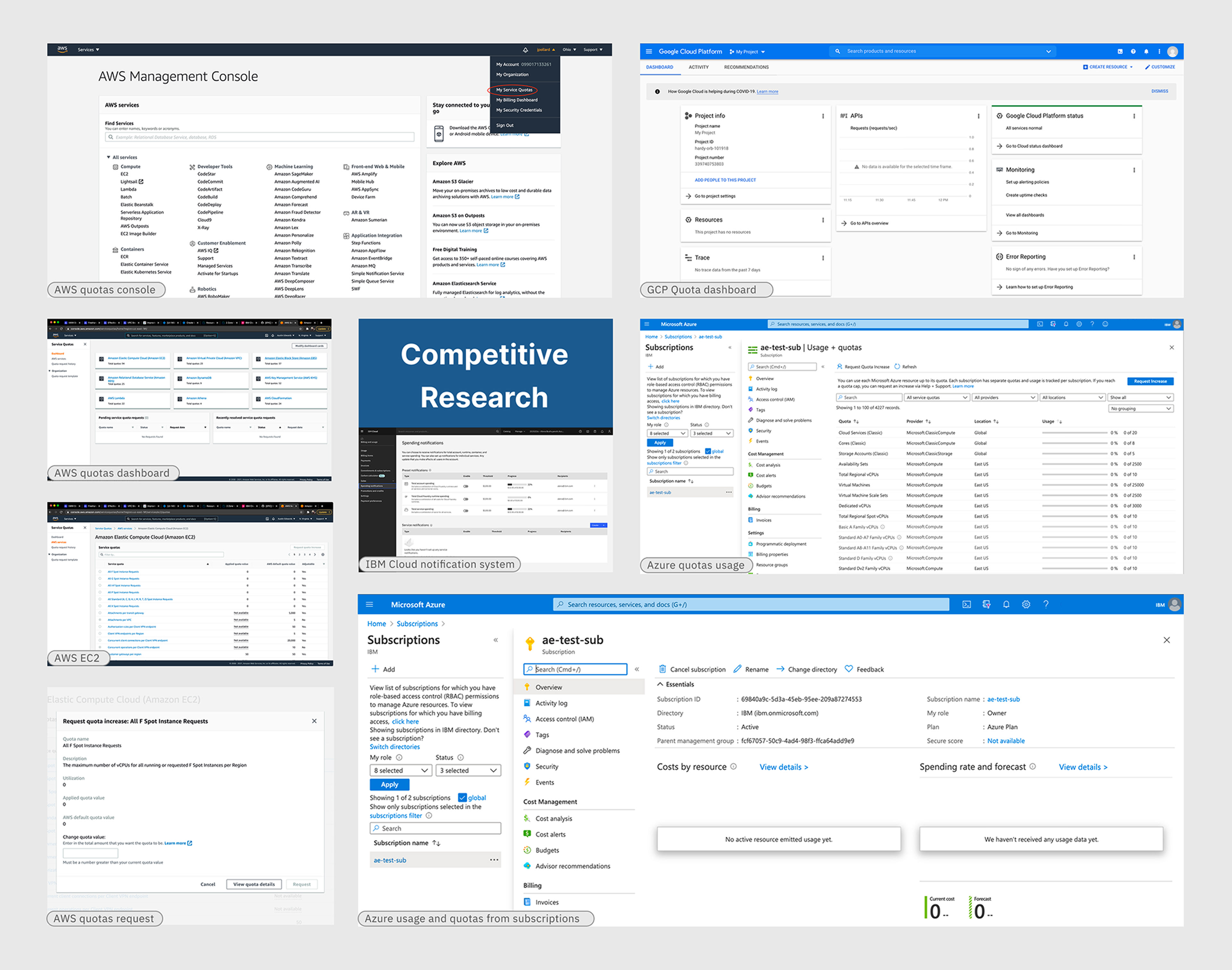
Competitive Research
Competitive subjects:
•AWS- Service Quotas
•Microsoft Azure- Quotas Subscription
•Google Cloud- Quotas
Research goal:
This competitive research examined industry leaders to uncover UX best practices in quota management, including:
•Cloud-console Information Architectures
•Quota monitoring
•A Streamlined quota-increase request flow
Main Takeaway
• AWS calls it “Service Quotas” surfaces it as a top-level item in the account dropdown, and you can easily request an increase to your quotes via a modal
• GCP calls it “Quotas” and surfaces this as a secondary nav item under IAM & Admin, you can increase a quota increase via a side panel
• Azure calls it “Quotas” and surfaces it in the account subscription experience, requesting an increase opens up a partially pre-filled support ticket form
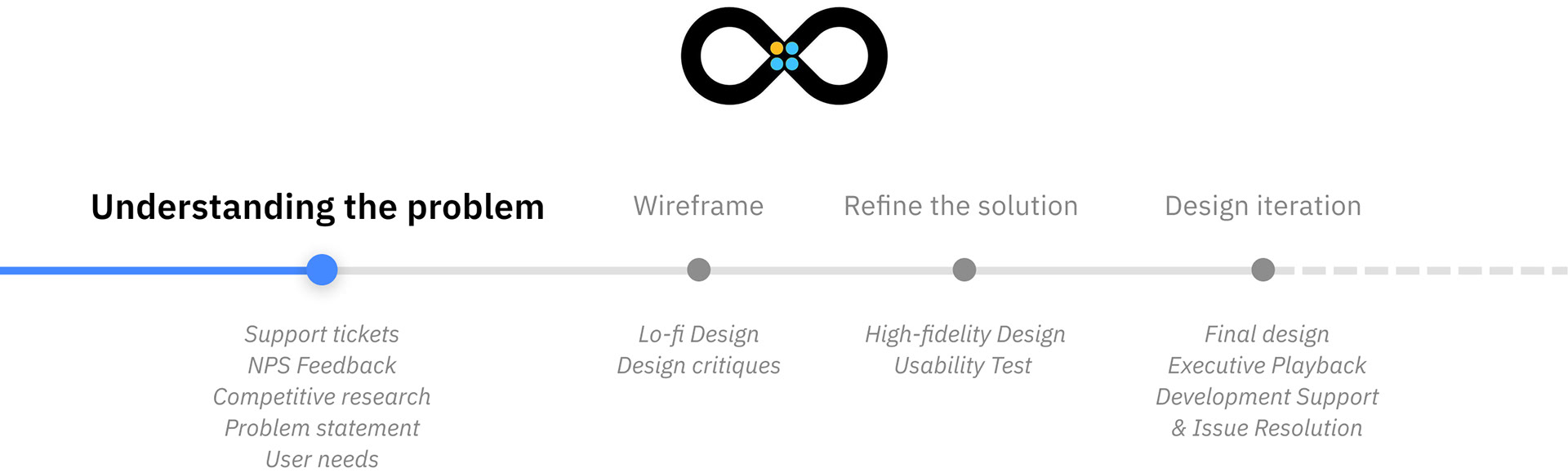
With a clear understanding of the problem, we created the Hill—a statement in IBM Enterprise Design Thinking that aligns stakeholders on design goals and guides the team toward meeting user needs.
Problem Statement- The Hill
As an Infrastructure Builder, who builds automation for ordering cloud infrastructure, I can view and manage my VPC quota and service limits any time, without IBM support.
User Needs


Low-fi Design
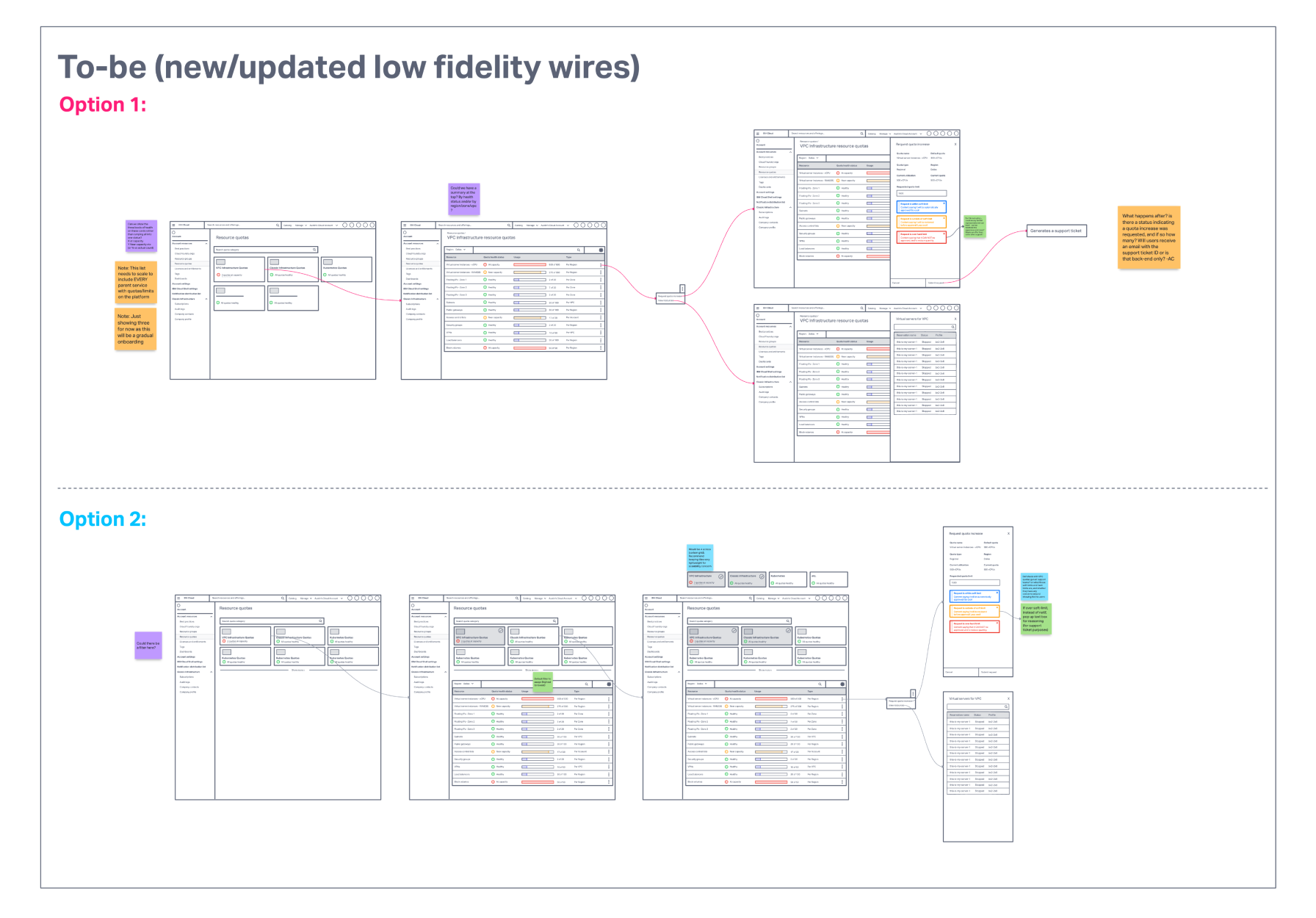
Low-fidelity wireframes were developed by synthesizing findings from competitive analysis, user interviews, and NPS feedback. These initial concepts were successfully validated during team critique sessions, confirming the core Information Architecture and streamlined the Resource Quotas Increase flows.
Client Feedback
We verified the low-fi design with users from a large financial client through structured user interviews. Participants were asked to complete tasks such as
• Checking resource usage
• Identifying quota limits
• Requesting quotas
User testing highlighted Option 2 as the preferred approach, with participants valuing the clear, high-level view of resource categories and the specific resources approaching critical limits.
Internal Stakeholder Feedback
We held design critique sessions with stakeholders—including cloud designers, PMs, architects, and tech sellers—leading to consensus on Option 2. This approach supports proactive capacity management and informed the refinement into high-fidelity prototypes for broader testing.

High-fi Design
We designed visually distinct tiles for the resource categories and highlighted severe quota numbers. These tiles serve as the primary interface for risk triage, helping users quickly identify, select, and drill down to the specific resources that may require a quota increase request.


The history chart and associated resources allow users to view their past usage at a glance. Users can also request a quota increase with a single click from the side panel, and the request is sent directly to the IBM Support team.
Usability test
Interview: 6 users from key enterprise clients (BNPP, CITI, Caixa, BoA).
Participants: Techsellers, Cloud Architects, Solution Designers, and Senior Leaders.
Feedback was gathered from both hands-on resource provisioners and strategic decision-makers.

User Quotes
" So this is a great tool because what it does it give us an ability to give the customer a crystal ball. " - Quote from Robert Speller, Complex Deal & Strategic Initiative Enablement Leader Americas


IBM Cloud Dashboard — Guiding Users to Quota Management

Quotas Management Dashboard — Expanded rows to display quota limits across regions.

Create a Quota Request — Inline feedback indicates whether the resource is eligible for additional quotas.

Utilization History — Allows users to customize the timeline and predict usage trends.

Create Quota Alerts — Enables users to set thresholds to monitor quota status.

View and manage all quota notifications efficiently.
Executive Playback for Alignment and Feedback
To successfully launch a solution impacting major enterprise clients, dedicated Executive Playback sessions were conducted early and often. The goal was to secure alignment on the design's strategic objectives, specifically the high-level architecture and its focus on proactive risk identification. This essential engagement guaranteed executive buy-in and secured the necessary resources for successful implementation.
Development Support & Issue Resolution
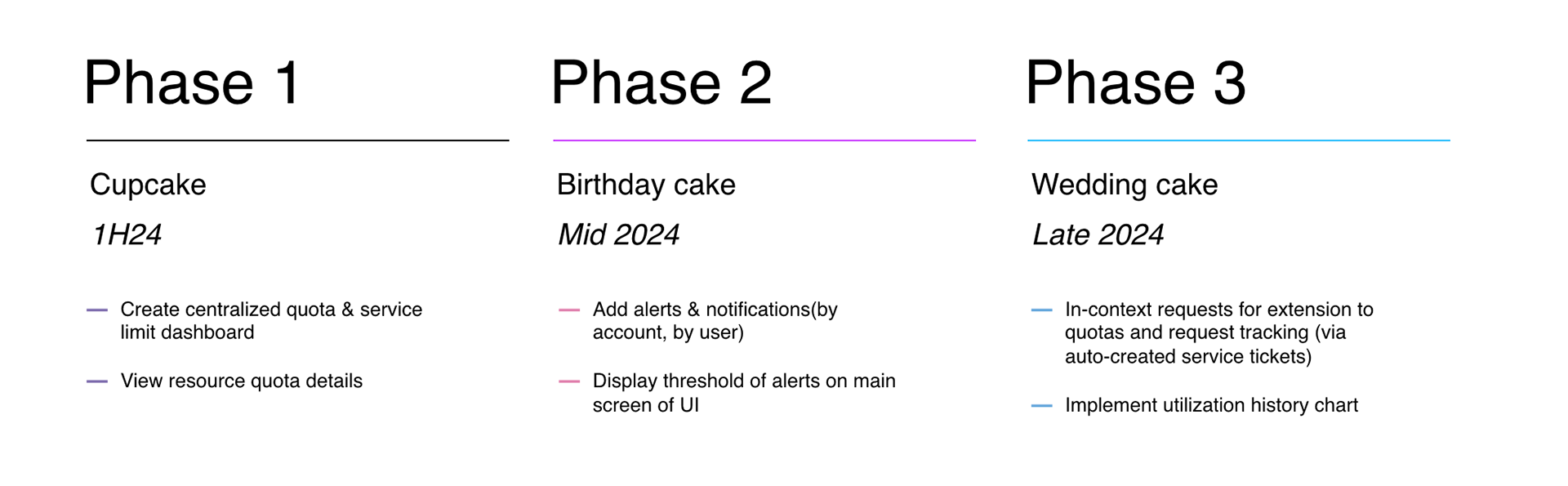
Defined three phases of the deployment plan with PM and development team to ensure a smooth rollout aligned with business goals.
I led quotas staging and production testing with the IaaS team, uncovering 28 issues and coordinating three-in-a-box meetings to plan their resolution. I worked closely with the development team to tackle all the issues, ensuring timely solutions.
When a tricky overflow menu problem arose, I consulted with the Carbon team and collaborated with developers to switch to React Table, successfully improving the interface and functionality.
Final Result and Reflection
This project has delivered a significant business transformation by turning a major client bottleneck—the reactive quota increase process—into a proactive solution. The new dashboard provides clients with the critical tools needed for predictable cloud operations, allowing them to accelerate deployment and avoid costly service failures. This not only directly improves the client experience but also acts as a powerful tool for strengthening relationships with key strategic accounts, proving the high-value impact of thoughtful UX design on enterprise growth and retention.